 | JavaScript | |||
|---|---|---|---|---|
| Prev | Home | Up | Next |
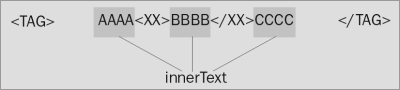
The HTML in between but not including the tags that define the element is extracted and any tags are removed. The resulting text is returned when this property is being read.
When the property is being written to, the start and end tags remain intact but everything between them is replaced with a text string. To place HTML tags between the tags, use the innerHTML property.
For some objects, this is equivalent to the text property that Netscape supports.
It is effectively the same as anElement.innerHTML as long as there is no mark-up on the text between the beginning and ending tags.
If you want to include the containing tags, then use the outerText or outerHTML properties instead.
You can assign new text to be displayed in the HTML element by using this property as an LValue.
This is not supported by Netscape although the text property may be supported by some objects. You can probably do all you need to do by means of the innerHTML property which Netscape 6.0 does support.
You will need to detect the browser type before attempting to use this property.
Be careful if you extract the innerText of an element and document.write() it back to the same document. You can create recursive loop situations if you are evaluating in global code during the document loading process.
You cannot set this property while the document is loading.
MSIE version 4 for Macintosh does not support this as widely as the Windows version or later versions of MSIE for Macintosh.
Netscape does not support it at all.
| Prev | Home | Next |
| Element.innerHTML | Up | Element.insertAdjacentHTML() |
JavaScript Programmer's Reference, Cliff Wootton Wrox Press (www.wrox.com) Join the Wrox JavaScript forum at p2p.wrox.com Please report problems to support@wrox.com © 2001 Wrox Press. All Rights Reserved. Terms and conditions. | ||